

Agent Composer is currently available in private preview for enterprise users. For more information or to request access, please contact your Contextual AI representative.
Overview
The first critical question is what type of workflow you need to build:- Static Workflow - You know exactly what steps the agent should take and in what order. You can still include a conditional step where LLM is used as a judge for decision making, but the key property is that the control flow is predefined, not decided at runtime by an agent.
- Dynamic Workflow - The agent decides which actions to take based on the user query. You can provide instructions to the agent, add guardrails, but the flow is controlled by the agent.
Static Workflow Agents
Sequential Flow
The best representative example for this is the classic RAG pattern—you enter a query, search the datastore, then generate a response.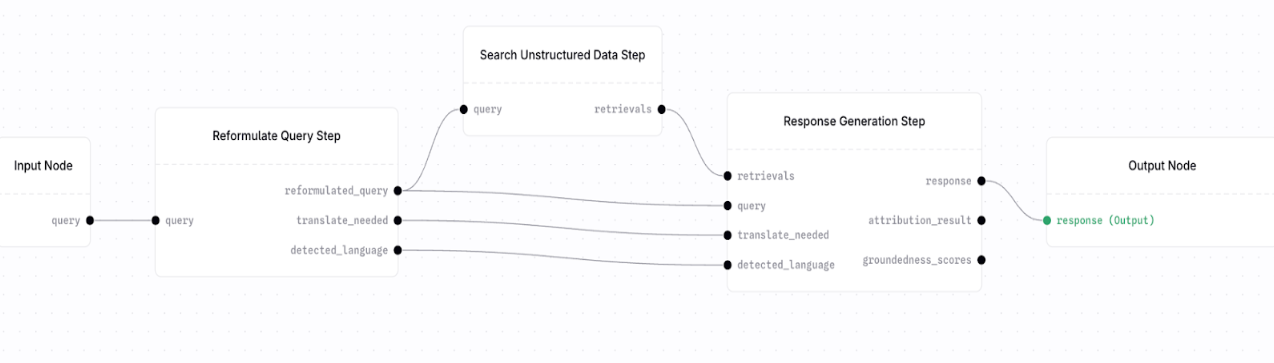
Reformulate Query Step here because in Response Generation Step, you have 4 required input fields: retrievals, query, translate_needed, detected_language. Since your Search Unstructured data step only outputs retrievals, you need to supply the remaining input fields and ensure that the Reformulate Query step is just the right fit for this use case.
The easiest way to identify these pairs of nodes is to identify the required input fields and supply it with correct output values from other nodes.
If a node requires inputs that your current step does not produce, look for a node that naturally produces those fields instead of manufacturing them manually.
Conditional Flow
You need different behaviors based on runtime conditions. Common use cases include:- Quality thresholds (e.g., “if search quality < 0.7, try web search”)
- User type routing (e.g., “if admin user, use full pipeline; else use restricted pipeline”)
- Fallback logic (e.g., “if no results from datastore, search web”)
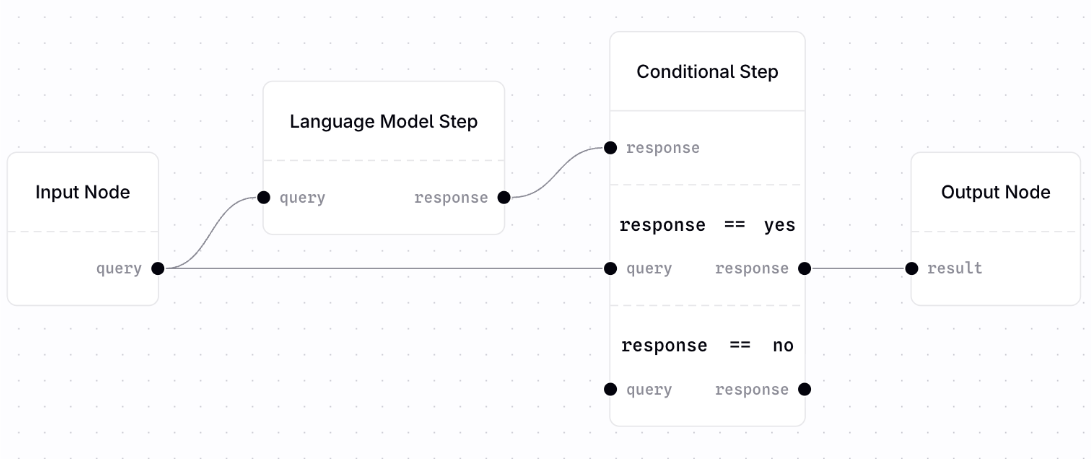
Language Model Step with Conditional Step. Although not strictly enforced, we generally recommend you use Language Model Step to allow an LLM to make a decision and output either a yes or no(or other set of values for conditional branching) which is then used for routing the request appropriately.
Dynamic Workflow Agents
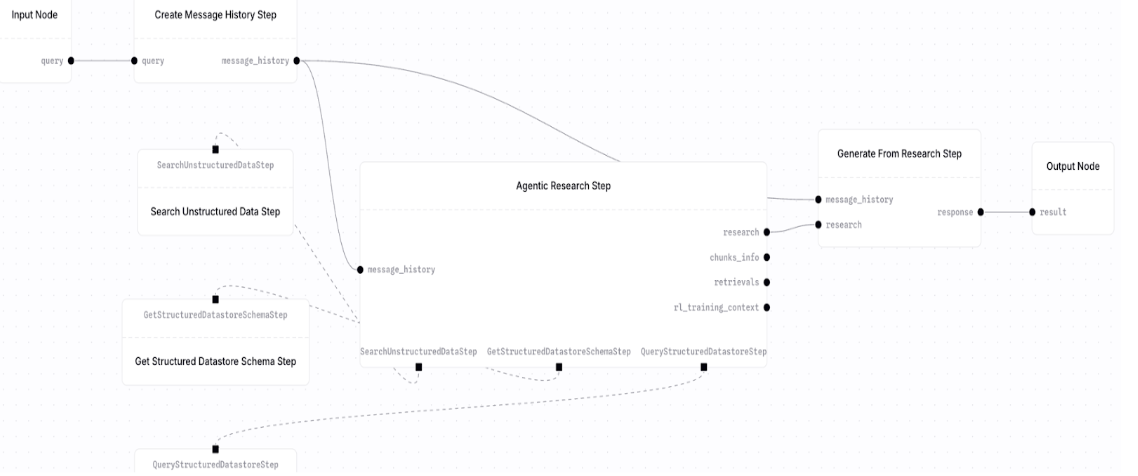
When you don’t know in advance whether the agent needs to search a datastore, make SQL queries to a structured datastore, make an API call, or perform multiple operations, useAgentic Research Step and provide it with a set of tools that the agent can access.
Use Cases
- Complex queries requiring multiple lookups
- We need different behaviors based on runtime conditions.
- Workflows where the next step depends on previous results
- Agents that need to “think” and plan
Create Message History Step. You can see its use case, but crucially it generates message history, which is a required input in both the agentic research step and the generate from research step; subsequently, this step is required whenever you are building a dynamic agent workflow.
In general:Input -> CreateMessageHistoryStep -> AgenticResearchStep -> Generate from Research Step -> Output
Choosing Nodes By Data Type
Structured Data
If you’re using the structured data ingested in your datastore, we recommend you start out with two tools:get structured datastore schema (for getting schema) + query structure datastore step (for making sql queries). You can then add tools like MetadataSearchStep to allow multi hop reasoning capabilities and so on.
Unstructured Data (e.g., documents, PDFs)
We recommend you start withSearch Unstructured Data Step and then refine/configure it by supplementing it with steps like FilterRetrievalStep, RerankRetrievalStep, and so on.
External Data Sources
Use external data sources when your workflow needs to call third‑party APIs or services at runtime, or access data that is not stored in your Contextual datastores. If you want to bring out your own data sources, use either of the steps:WebhookStep (for REST APIs) or MCPClientStep (MCP servers) to interact with external sources. This is where you need to use data transformation steps to properly format your request/response structure. For instance, you can use JSONCreatorStep to format JSON for an API.
Data Processing/Transformation
Primitive nodes likeGetMemberStep, SetMemberStep, WrapStep, MergeStep are all useful for transforming the data as per your use case
Summary: What am I building?
Simple Q&A over documentsReformulateQueryStep → SearchUnstructuredDataStep → ResponseGenerationStep
Agent that decides what to doCreateMessageHistoryStep → AgenticResearchStep (with tools)
API integration
- Simple call →
WebhookStep - MCP server →
MCPClientStep
- Simple if/else →
ConditionalStep - Complex logic →
AgenticResearchStep
GetMemberStep, JSONCreatorStep, etc.)
Multi-source search
- Fixed sequence → Multiple
SearchSteps in sequence - Dynamic selection →
AgenticResearchStepwith search tools