

Overview
This agent performs automated root cause analysis on Mazda Connect infotainment system logs. It cross-references CMU (Car Media Unit) event logs against a debug reference guide to decode crash sequences, identify software faults, and trace the root cause of system restarts—including subtle failure modes like format string vulnerabilities triggered by podcast metadata. Powered by the Device Log Analysis template in Agent Composer—available for Enterprise customers; request a demo for access.Try the Demo
Launch Demo
Analyze infotainment logs yourself
Running on the production DLA template. Demo queries are cached and sped up for demonstration purposes.
The Problem
When an embedded vehicle system crashes repeatedly, engineers must determine whether the root cause is a hardware fault, a software bug, corrupted storage, or an external data input triggering unexpected behavior. Mazda Connect CMU logs contain:- Boot diagnostics (ROM CRC, RAM test, NAND mount, crash log presence)
- Podcast feed sync events including RSS fetch, metadata parse, and format string scanning
- Watchdog timer heartbeats and timeout sequences
- Per-subsystem events across CMU-SYS, CMU-POD, CMU-META, CMU-RSS, CMU-AUDIO, CMU-BT, CMU-NAV, CMU-DISP
- Crash dumps, reboot reason codes, and NAND storage error logs
- Recovery and workaround sequences
%n conversion specifier behavior to diagnose correctly.
The Real Story
In 2014–2016, thousands of Mazda owners discovered their car stereos were stuck in a reboot loop. The culprit turned out to be a podcast: “99% Invisible,” hosted by Roman Mars. The infotainment system’s podcast player was written in C and usedprintf() to display show titles on screen. The title “99% Invisible” contains a percent sign. In C, printf() treats % as the start of a special formatting instruction. When the software tried to display the title, it didn’t just show the text — it tried to interpret % In... as a format code.
Specifically, the sequence %In means:
%— start of a format specifierI— length modifier (valid)n— write the number of bytes printed so far to a memory address
%n specifier is dangerous because it writes data to a pointer. The software didn’t supply a pointer — it was null (0x00000000). Writing to a null pointer causes an immediate crash: a segmentation fault (SIGSEGV). The system’s watchdog timer detected the crash, rebooted… and immediately crashed again trying to sync the same feed. This happened every time the car started, producing an infinite reboot loop.
The fix: a developer created an alternate podcast feed with the title “99 Percent Invisible” — spelling out the percent sign to avoid triggering the bug.
This story was covered on Reply All Episode #140 and 99% Invisible Episode #350.
How It Works
In production
What you do: Upload a CMU event log and optionally a debug reference guide, then ask a query—for example “Why did my car stereo restart?”. What happens automatically: A multi-agent implementation takes over. The system parses the log, builds a searchable database from the log and reference files, runs root cause analysis, and produces outputs. Pipeline stages: Uploading files → parsing logs → building the database → root cause analysis → generating the report. Outputs: The agent delivers a detailed RCA report covering executive summary, session-by-session timeline, crash sequence decoded step-by-step, root cause identification, and recommended actions. It correctly distinguishes between NAND storage warnings (a red herring) and the actual crash trigger. Auditable: Every step is visible—tasks, trajectory, intermediate artifacts, and the final report—so teams can follow the reasoning and verify the diagnosis.In this demo
Sample Mazda CMU files are preloaded; choose a suggested query and run the analysis.Example Questions
Suggested queries in the demo:- “Why did my car stereo restart?”
- “Was the NAND storage error related to the crash?”
- “What exactly is the format string vulnerability and how does it work?”
Output
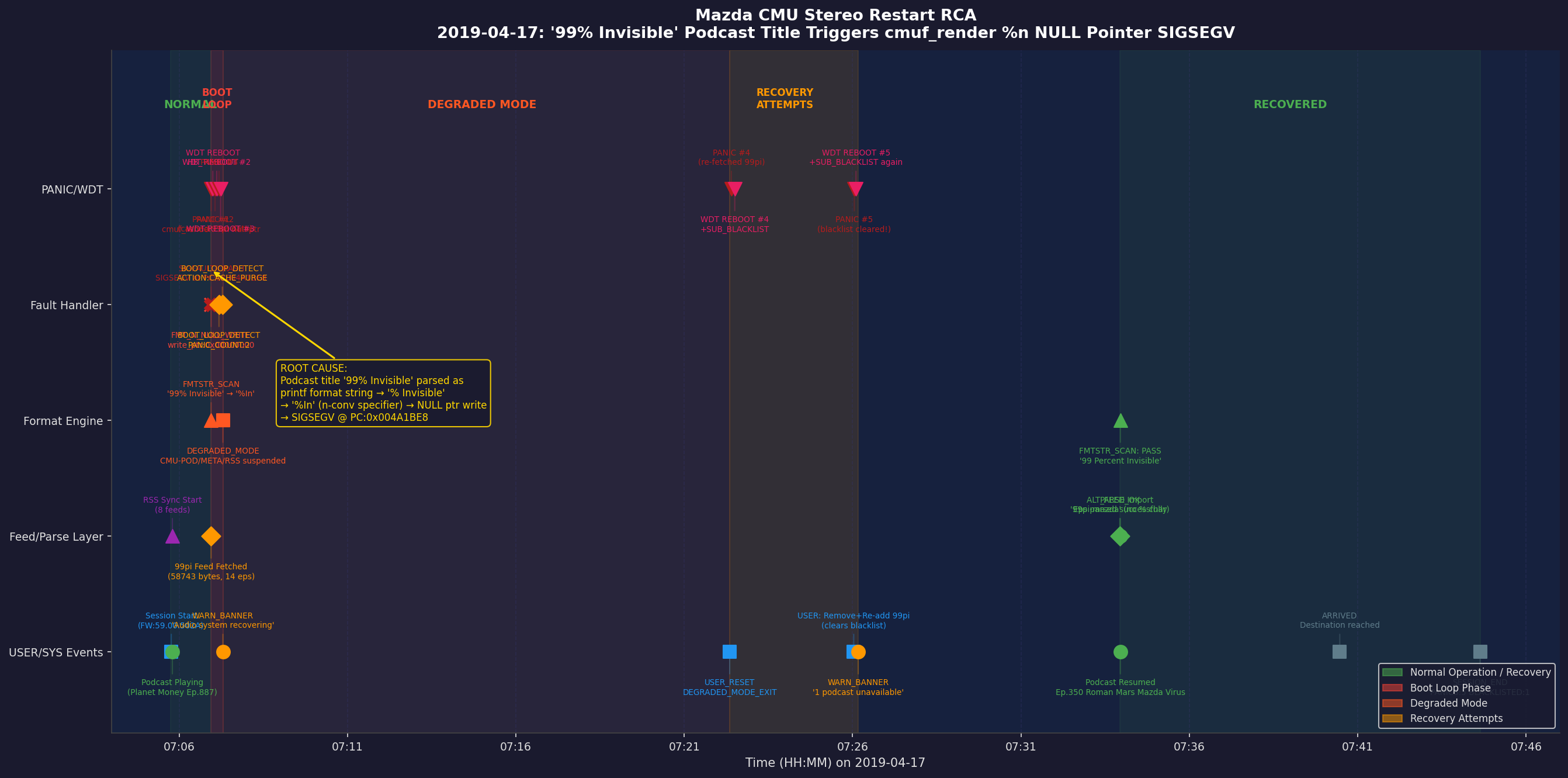
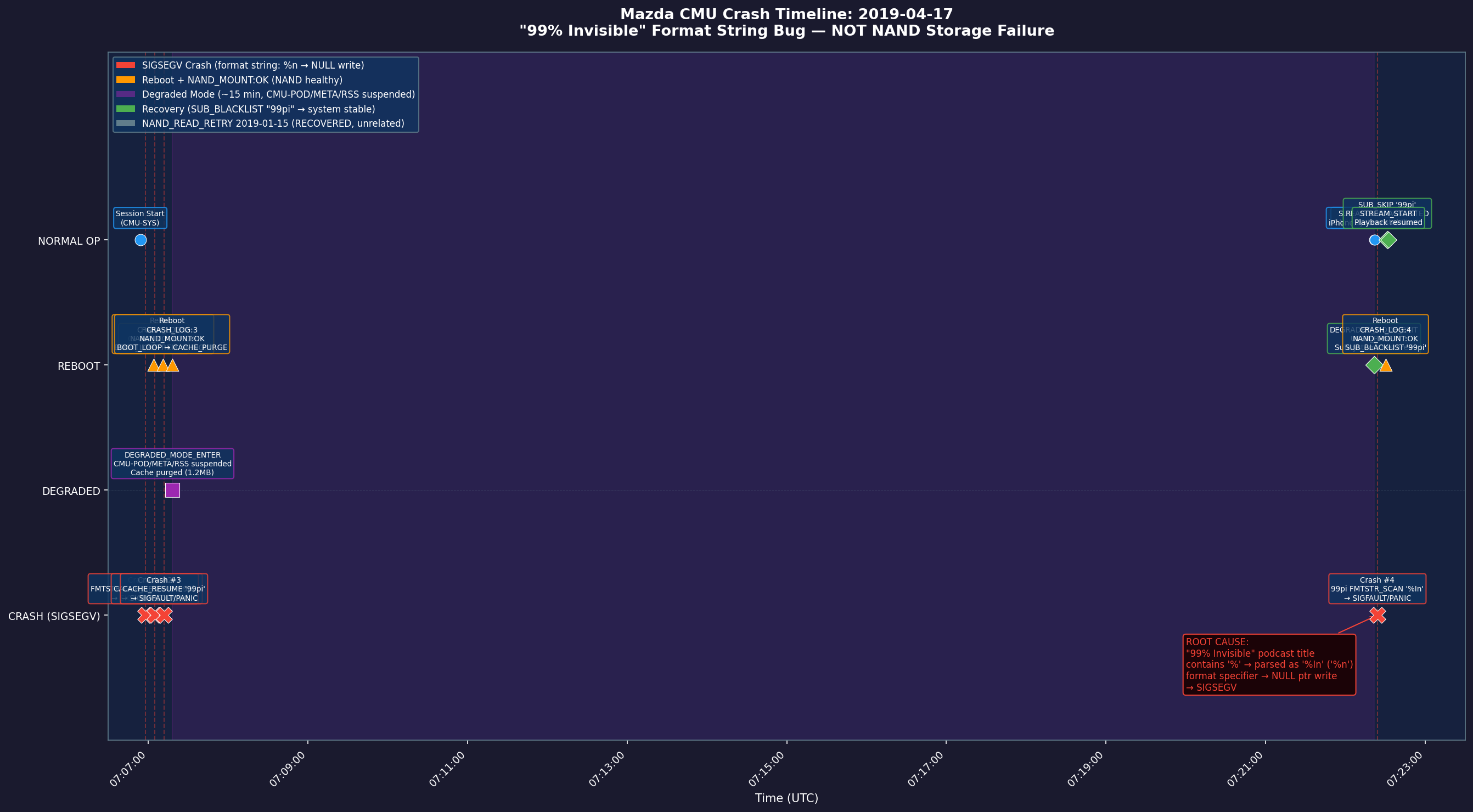
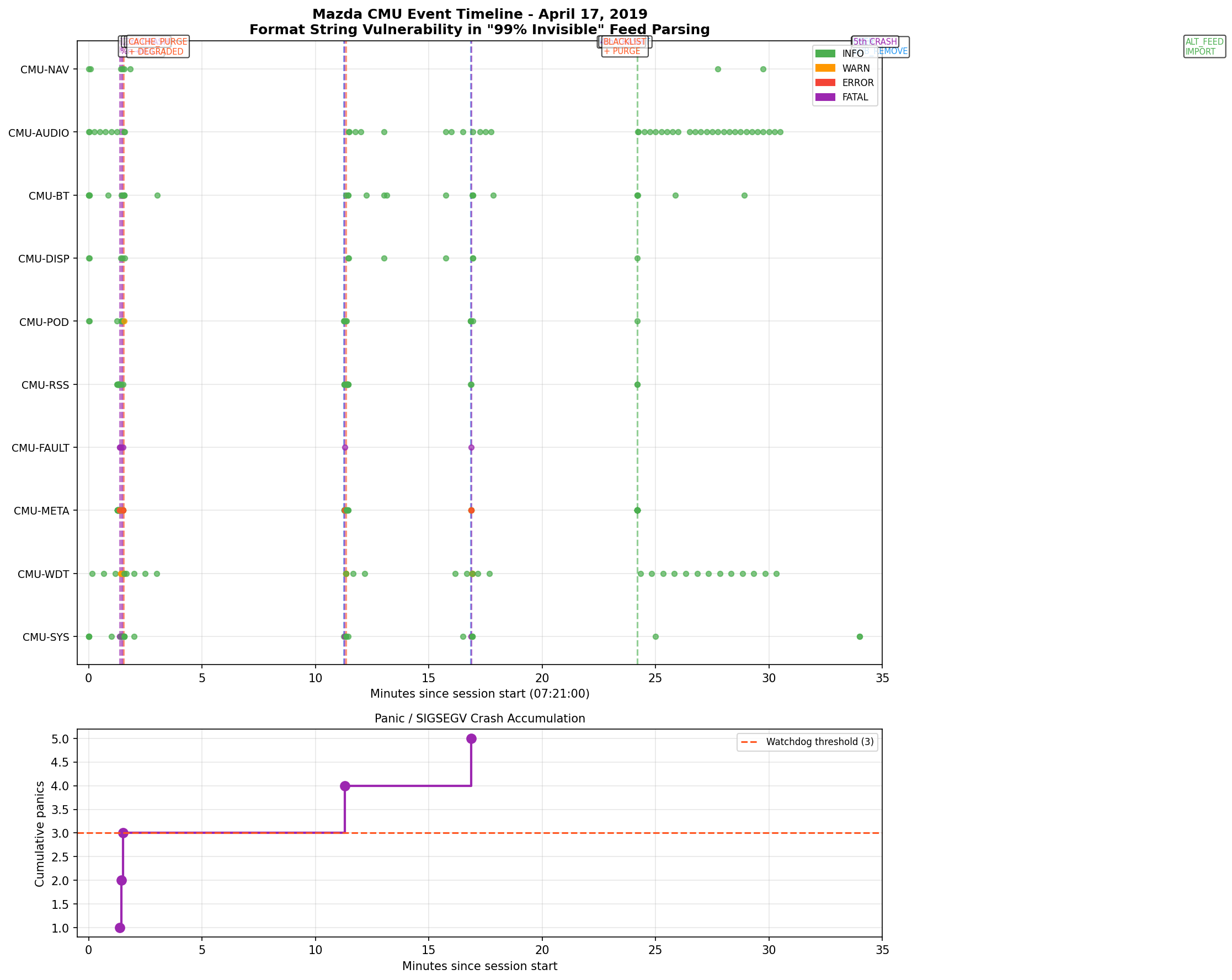
Example outputs from the three suggested queries: “Why did my car stereo restart?” — Full incident timeline showing the CMU’s progression from normal operation through degraded mode, five recovery attempts, and final recovery. The event flow traces PANIC/WDT, fault handler, format engine, feed/parse layer, and user/system events — pinpointing the%n null pointer SIGSEGV triggered by the “99% Invisible” podcast title as the root cause:
%n writes bytes-written count to a null pointer → SIGSEGV:
- Executive summary — Root cause (podcast feed sync triggering a printf format string vulnerability via
% Inin the show title “99% Invisible”), crash mechanism, and impact (boot loop until workaround applied) - Session comparison — Session 1 (healthy baseline, subscription added) vs. Session 2 (crash, boot loop, recovery) with key differences highlighted
- Crash sequence decoded — Step-by-step walkthrough of the failure: RSS fetch → metadata parse → SHOW_TITLE_PARSE → FMTSTR_SCAN miss → printf call → null pointer write (SIGSEGV) → watchdog timeout → reboot
- Red herring analysis — Explains why the NAND storage warning is coincidental and not causally related to the crash
- Technical explanation — How
% Inis parsed:%triggers format spec scan, space is a flag,Iis a length modifier,nis the conversion specifier that writes bytes-written count to a null pointer, causing the segfault - Recommended actions — Subscribe to the alternative feed “99 Percent Invisible” (no
%character) as an immediate workaround; firmware fix is to sanitize show titles before passing to printf
Mazda sample files in the demo
- Device log (
mazda_device_log_30mb.txt) — A two-session CMU event log spanning a healthy baseline session (podcast subscription, normal playback) and a failure session (feed sync crash, five-cycle boot loop, and workaround recovery). Log entries include severity (INFO/WARN/ERROR), subsystem tags, and event codes. - Debug reference guide (
mazda_debug_rules.txt) — A CMU debug reference covering subsystem tag definitions, event code catalog, format string vulnerability explanation (including the exact byte sequence[0x25, 0x20, 0x49, 0x6E]="% In"), watchdog behavior, NAND error classification, and recovery procedures.
Learn More
- Device Log Analysis (overview) — General DLA template and all three sample datasets
- 3GPP Wireless — LTE-style eNB/device logs
- ATE Board Validation — Board validation / tester logs
- Getting Started with the Contextual AI Platform
- Agent Composer Templates — Basic Search, Agentic Search, and Device Log Analysis (Enterprise)
- Request a demo